
Awhile ago, I printed out the Cricut Handbooks for the cartridges I owned for my very own Cricut Binders. In case you want to read more, click here. Several people have inquired how I printed the pages so I wanted to help others by writing up a quick tutorial that will help you print out the handbooks.
In order to begin, you will need the PDF document of the cartridge handbook you would like to print out. For this example, I am going to use the Alphalicious. You can go HERE to download the handbooks you need.
1. Open the Alphalicious PDF document. It will look like this:

***********************************************************************
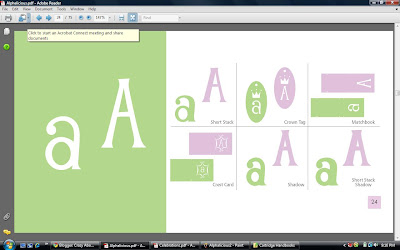
2. For my binder, I only wanted to print the pages that illustrated the cuts, not the directions. What you need to do for each individual cartridge handbook is find out where the cut pages begin and end. For Alphalicious, it begins on page 24:
and ends on page 73:
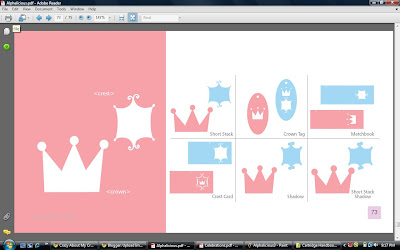
Do not forget these two numbers as you will enter to enter them in the next few steps.
***********************************************************************
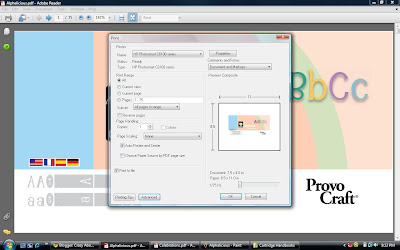
3. Click FILE and then PRINT. A new screen will open up. It should look like this:
***********************************************************************
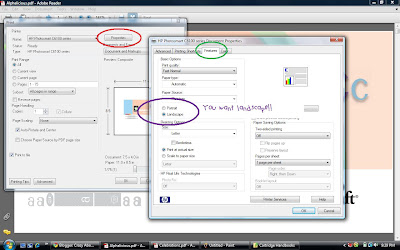
4. Before you modify any categories, you need to change the the orientation of the paper. You need to click properties and change the orientation. I have to click FEATURES in my document properties but you might have to click around to find where you need to change yours.
***********************************************************************
5. You now need to return to the print menu. Follow these directions for modifying the settings :
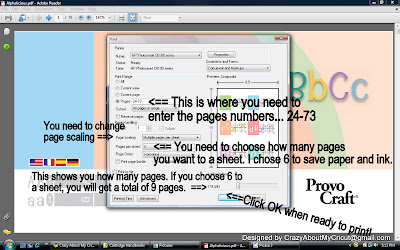
If you did it correctly (and chose 6 sheets per page), it will look like mine!

Good luck printing them! If you should have any questions, please feel free to email me at crazyaboutmycricut@gmail.com
**A Note About The Cricut Handbooks**
If you access the link above, you will notice that I have the majority of the Cricut Handbooks. I do not have the ones that Cricut.com has not published yet. However I will be updating the list of handbooks as they become available. Also some of the new handbooks, such as Storybook, are the low quality ones due to Provo Craft protecting their images from SCAL users. However in my opinion, the quality is still good enough to print for the binder.





 You do have to buy replacement blades and cutting bars but they aren't expensive especially if you use a M's coupon. Plus you can buy additional blades for scoring, perforating, deckle, pinking, wave, and scallop!!! So anyways, give the Fiskars Desktop Rotary Trimmer a try if you are in the market for a new trimmer! Hope this helps anyone who can't decide what trimmer to purchase!


